NPCS Mobile App: How to Install, Register, and Use the Android Application
The NPCS mobile app for Android has been officially launched by PNP. This app is currently available on the Google Play Store to download and install. This is a police clearance app that allows mobile users to perform all the clearance tasks, including registration, clearance application, renewal, and verification. The app is linked to the centralized NPCS database and the web portal. It has the same options and features as the official PNP website.
What Is the NPCS Mobile App?
The Directorate for Investigation and Detective Management (DIDM) has officially announced the NPCS app, which is free to download on the Google Play Store. This app provides a user-friendly graphical user interface (GUI) to smartphone users. This app can be said to be a mobile version of the PNP Clearance website with all the features optimized for mobile screens. Currently, the NPCS app is available for Android users only.
Note for iPhone users: The iOS version of the NPCS app is currently not available. iPhone users may use their web browsers to apply for clearance.
NPCS Android App’s Salient Features
| Feature | Details |
|---|---|
| Registration | You can directly complete registration and account creation. |
| Clearance Application | Online clearance application after login. |
| Online Appointment | Book the appointment online on the app for the desired station for biometric verification. |
| Updates and Notifications | Application status, notifications and appointment reminders |
| Verify Clearance | Online verification of clearance in the app through the reference number |
How to download and install the NPCS app?
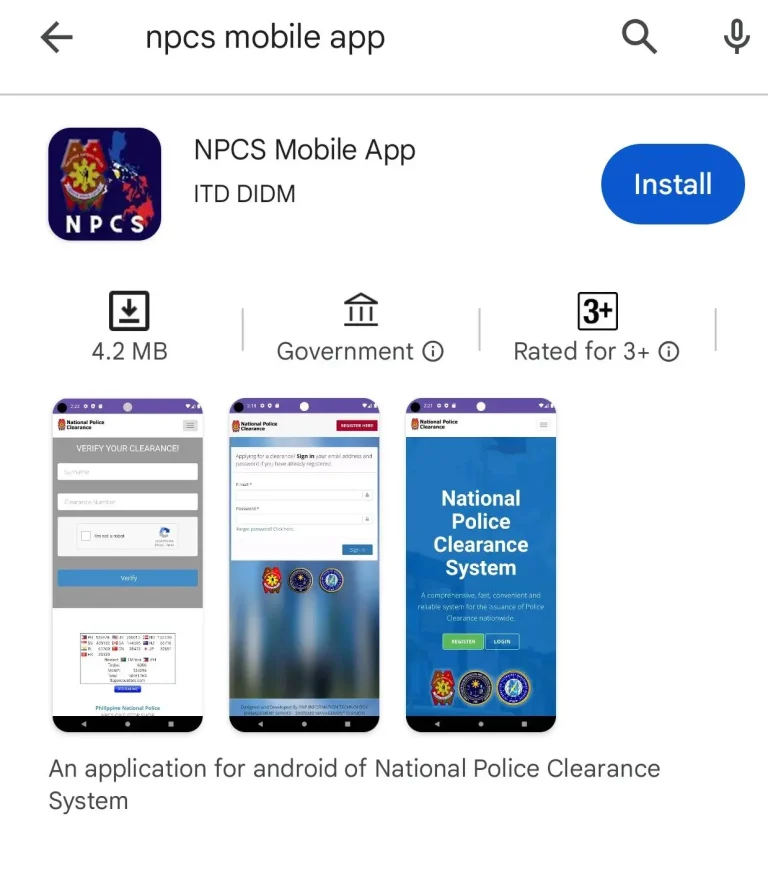
This app is available on the Google Play Store for Android users. This app is free of cost. The app is available on the Google Play Store at no cost. Android users can follow the steps below to install the app:
- Open the Play Store on your Android smartphone.
- In the search bar type “NPCS Mobile App” and search
- The official app with the same name will be displayed on the screen. Click on the Install button to start installation.
- Currently, the iOS version of the app is unavailable. iPhone users can use a web browser to access the official PNP clearance website, which works well on the mobile screens as well.
Important Tip:
Make sure to install the official app by ITD DIDM from the Google Play Store only.
Never install non-verified APKs or apps from other sources.
NPCS Android App Registration: Step-by-Step
Registration on the NPCS app is the same as registering through the PNP Clearance web portal. If you are registered through the web portal, you can log in to the mobile app and vice versa. You can register once.
Here we go through the registration process through the mobile app:
- After installation of the NPCS Android app, open it, check for the Register button, and tap it.
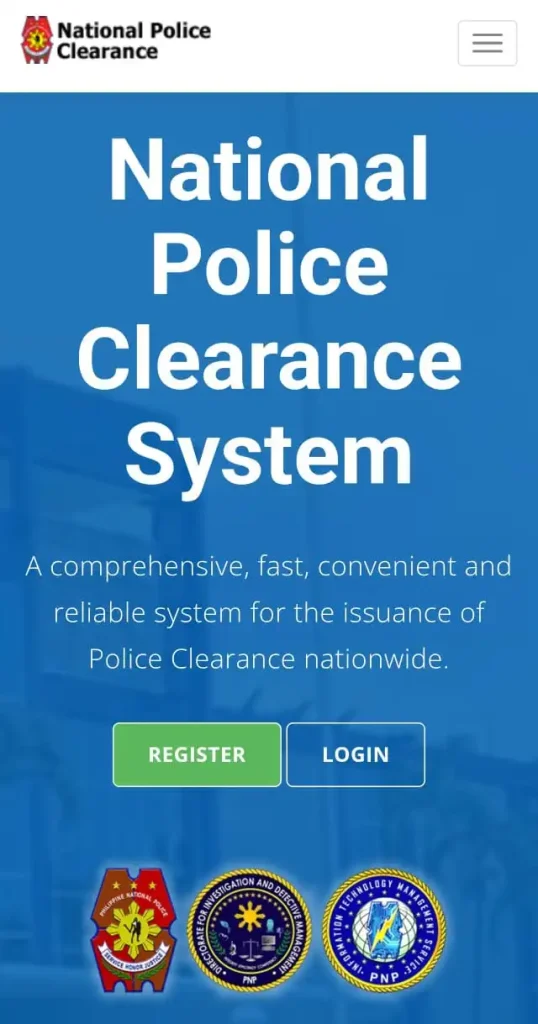
- Go through the process of human verification by checking the option.
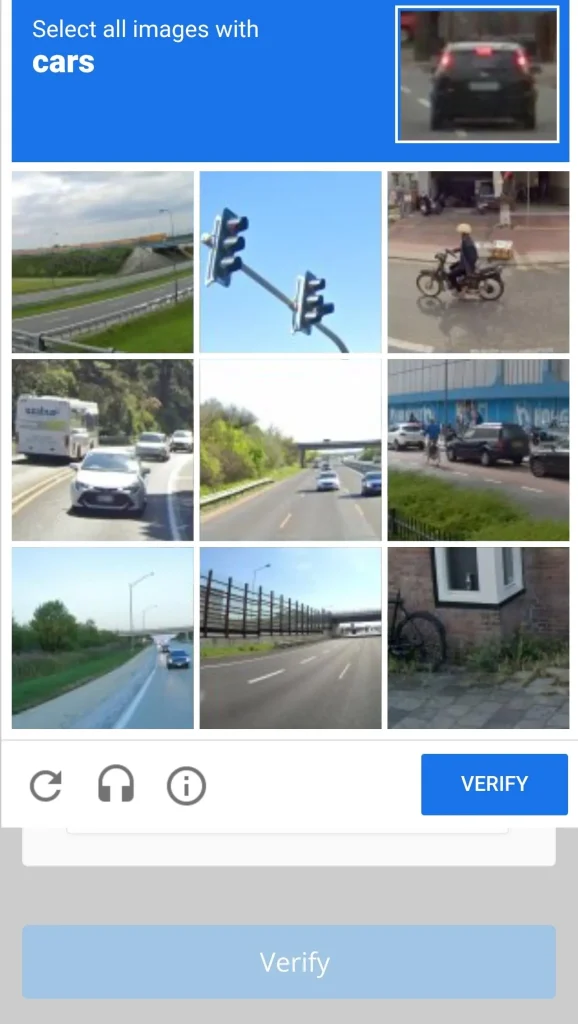
- You will be asked to complete the puzzle. Human verification will be completed after the puzzle is solved. Then tap “Begin” to start the registration.
(If you are unable to solve the puzzle, you can try again or select the refresh button to change the puzzle.)
- Enter your personal information in the open dialogue boxes, including your full name, a valid email address, and a password.
- (The password must meet the complexity criteria, including upper case letter, lower case letter, special character, and number with a minimum length of 8 characters.)
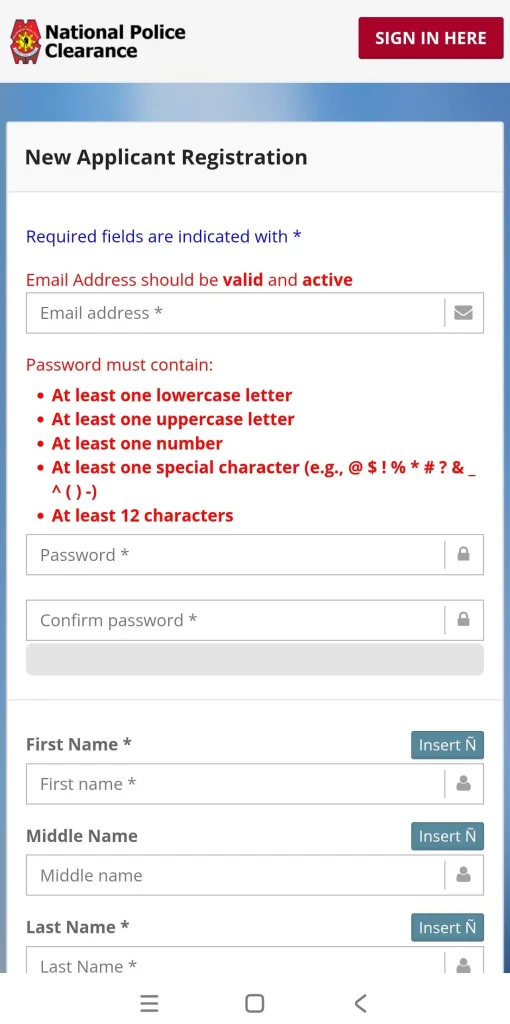
- To accept all terms & conditions and the privacy policy, tick all the check boxes.
- The NPCS system will send an auto-generated email to your registered e-mail address. Check your inbox and open the link, and click to activate your account.
- An OTP is sent to your mobile phone via SMS; you need to verify that too.
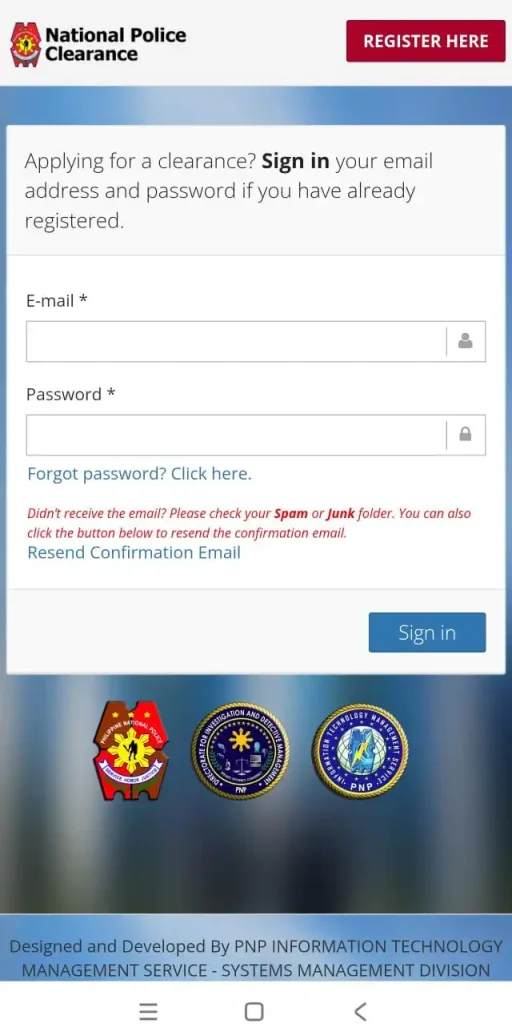
Sign in to the app with the newly created login credentials.
- After logging in, complete your profile in the edit profile section by entering your address, birth date, gender, and valid ID details. Then tap the Save button to update the profile.
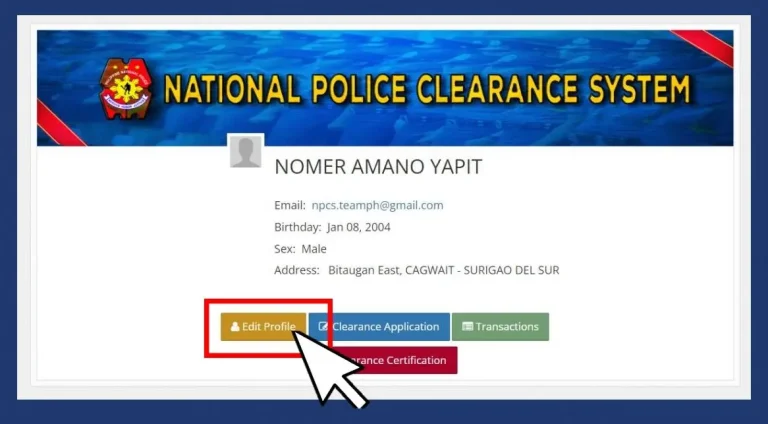
Advice: Ensure you enter the exact same details as appeared on your original documents. There should be no spelling mistakes. Such issues cause delays in the verification process. Cross-verify all details before saving.
How to Apply for Police Clearance Using the NPCS Phone App
After the registration and profile completion, you just need to log in on the NPCS app and start your police clearance application. The process is very simple, and all can be done online through the app, sitting at home. You have to visit the branch only for biometric verification if you are applying for the first time for police clearance. To visit the branch, you have to book an online appointment, which is also done through the app. You don’t need to worry about the online procedure through the app. Here we will explain the step-by-step procedure to apply for police clearance through the app.
Step-by-Step Procedure – Online Police Clearance Police Clearance App
- Sign in to the NPCS app by entering your login credentials, i.e., username and password. and tap Clearance Application.
- Complete your profile and personal information entry.
- Tap “Clearance Application” on your home screen.
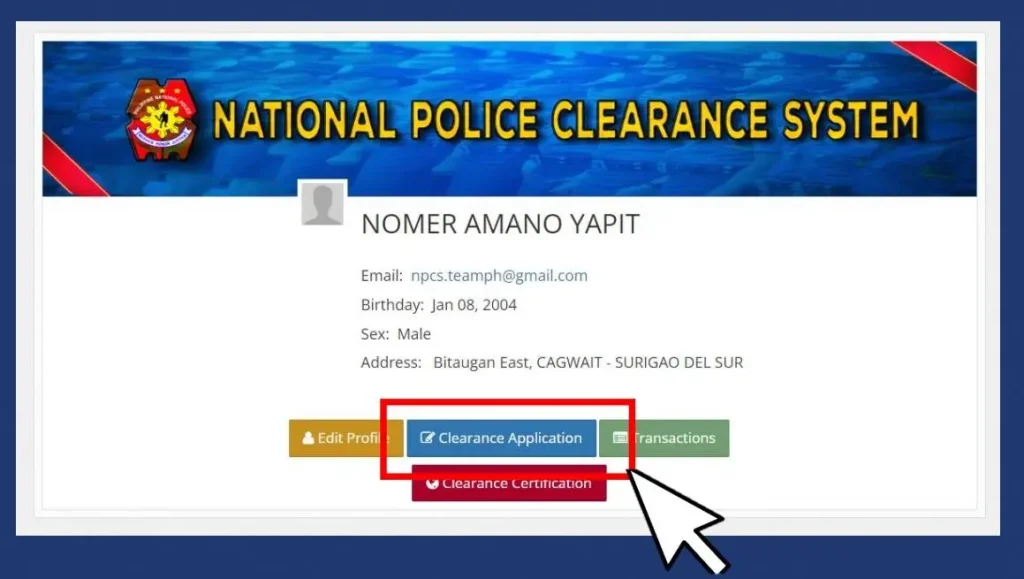
- Select the purpose for which the police clearance is required.
- Book your appointment at your preferred police station for the personal appearance for verification, including fingerprints and picture capturing. If you encounter any issue, refer to the guide on booking an online appointment.
- Select a suitable police station from the available list. Choose the station that is convenient for you to visit.
- Select the date and time you want to visit. The available time slots will be visible to you in the system. Choose accordingly.
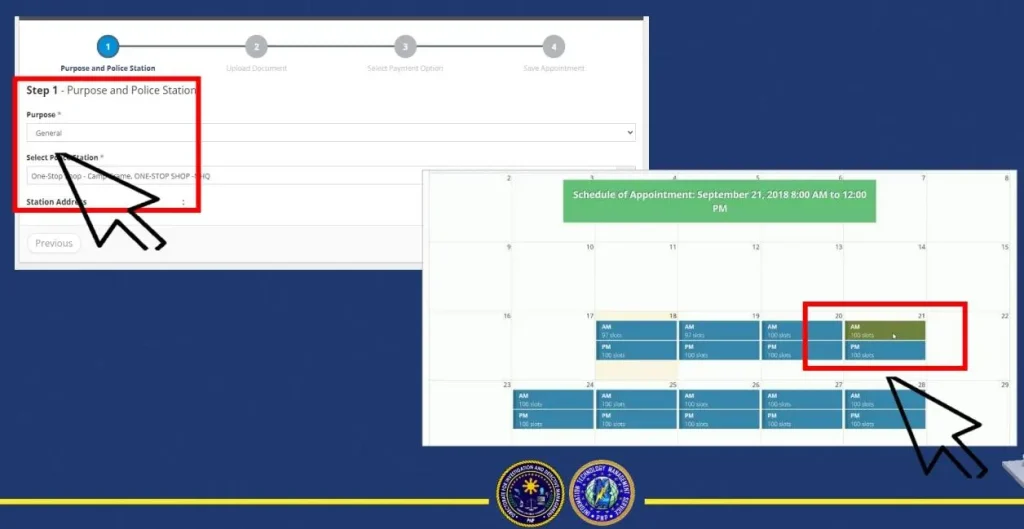
Note: In case the appointment is not available on your desired dates. Try to choose some other police station; slots might be available there. In order to avoid appointment issues, it is recommended to apply well in advance and try selecting off-peak times.
- Review all the details before confirmation.
- Select the payment option from the multiple payment options. Some of the payment options include Land Bank, PayMaya, GCash, and others. In the example shown in the screenshot below, “Land Bank of Phils” is chosen. However, you can select as per your choice from the available options.
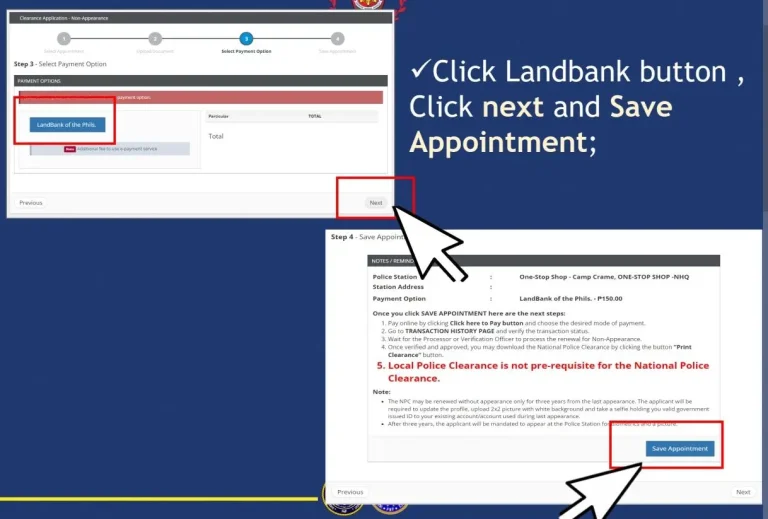
- Then click next and save the appointment. An APPOINTMENT REFERENCE NUMBER will be generated by the system. The total fee, which is currently 150, will also be visible to you on the screen.
- Proceed to pay the fee by tapping on the “Click here to Pay” button. Complete the fee payment by following the steps needed for an online payment transaction.
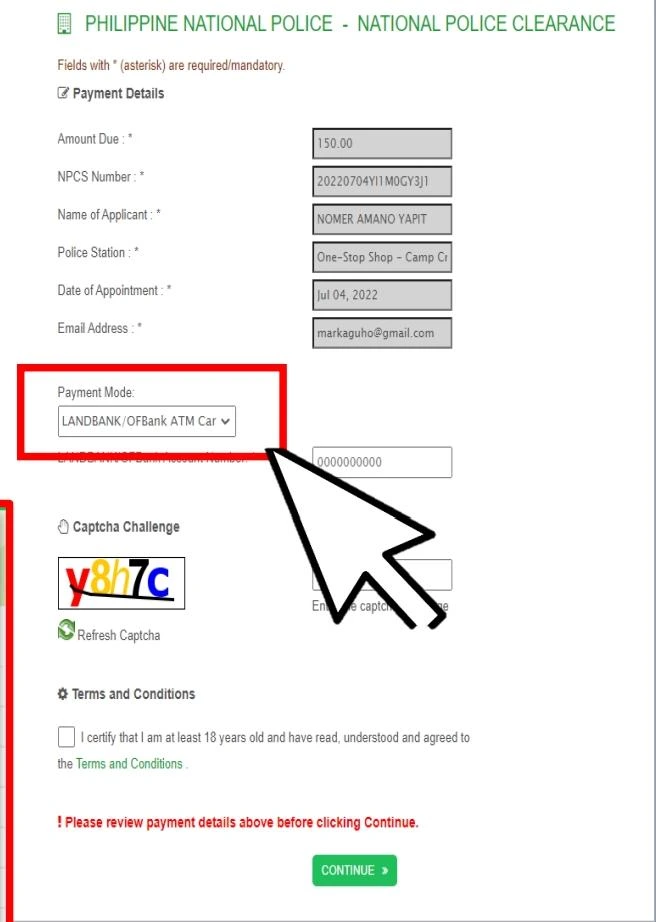
NOTE: The base fee is ₱ 150, but the payment channel may charge an additional fee, which varies from ₱ 10 to ₱ 30 depending on your selected payment channel.
CAUTION: PNP only accepts online payment through the “Click here to Pay” button option. For over-the-counter payments and other options, select the “cash payment” option while selecting the payment options.
- Fee exemption for FTJS: As per government order RA 11261, the first-time job seeker applicants are entitled to one-time free clearance. However, they have to furnish FTJS certification and present it to the PNP officer at the time of biometric verification.
- After payment, go to the Transaction History Page to verify the transaction status and save the reference number and payment confirmation status with you.
- Visit the selected police station on the appointment date and time along with the required documents, complete your biometric verification, and get the clearance.
What are the requirements at the police station on appointment day
On the appointment date, wear decent clothes, arrive in time, and try reaching half an hour before the actual time. Late arrival may cause cancellation of your appointment. Bring the following documents:
- 1x valid government-issued ID
- Payment confirmation Slip or proof of fee payment
- Appointment Reference number
- (We advise bringing 2x IDs; in case of HIT, additional verification documents might be helpful.)
CAUTION! No walk-in applications accepted. Don’t risk missing the appointment
If you missed your appointment for any reason, you have to reschedule it online again. As per PNP’s policy for NPCS, “Walk-in applications are no more accepted.” The system strictly adheres to the policy of “No appointment, no entry.”
What Happens at the Police Station
You will present all the documents to the verification officer. The following tasks will be performed there:
- Documents and identity verification
- Picture Capturing
- Fingerprints capturing
- Digital Signatures
In large police stations, these separate counters are made for each task, like ID verification, pictures, and biometrics. However, in small stations, multiple tasks may be performed at one counter. On average the biometric verification process takes 10-15 minutes.
- After completion of the biometric verification process, the NPCS system checks the centralized PNP database for your criminal record against your name.
- If there is no criminal record against your data, the clearance is printed and issued to you on the same day.
- However, if there’s a “HIT,” you might need additional verification, which may take more time. “Hit” means there’s a criminal record found against your name.
What to do in case of a HIT status?
- Sometimes, despite having a clean record, you encounter a HIT STATUS; this happens if your name matches with some criminal having the same name.
- Don’t panic in this situation; wait for 2-3 days; such issues are resolved by the system automatically with additional verification on its own. This issue is normally resolved by providing the additional verification documents.
- In case your HIT status doesn’t clear after 2-3 days, you might need additional verification. The PNP officer will call you to visit the police station with required additional documents for verification. After confirmation of verification, your name will be cleared from the HIT Status.
- In case you actually have some criminal record or pending court cases, you will be required to clear those by fulfilling the legal requirements in order to clear your criminal record from the NPCS database.
What are the cases in which physical appearance is not required?
Online appointments and physical appearances are not always required for the police clearance. There are some cases where the clearance is issued without visiting the police station:
Clearance Renewal:
If you are applying for the clearance renewal and your last performed biometric verification date is less than three years old. In such a case, while applying for clearance renewal, select the renewal without appearance option.
Clearance certification:
The clearance certification application also doesn’t require a physical appearance. However, it is valid only for specific categories of persons, including overseas Filipinos, bedridden persons, probationers, and deceased persons. However, such applicants have to select the option of “clearance certification” in the NPCS app at the time of application.
Requirements for non-appearing applicants:
Non-appearing applicants have to update their profiles and upload a 2×2 picture and selfie holding a valid government-issued ID. In clearance certification, there can be additional document requirements separately for each category.
Clearance for Non-Appearing Applicants:
After the online process is completed through the mobile app, the system will scan the applicant’s details in the PNP centralized database; if no criminal record is found, the clearance will be issued. The applicant can download a police clearance certificate or clearance certification with a single tap in their app.
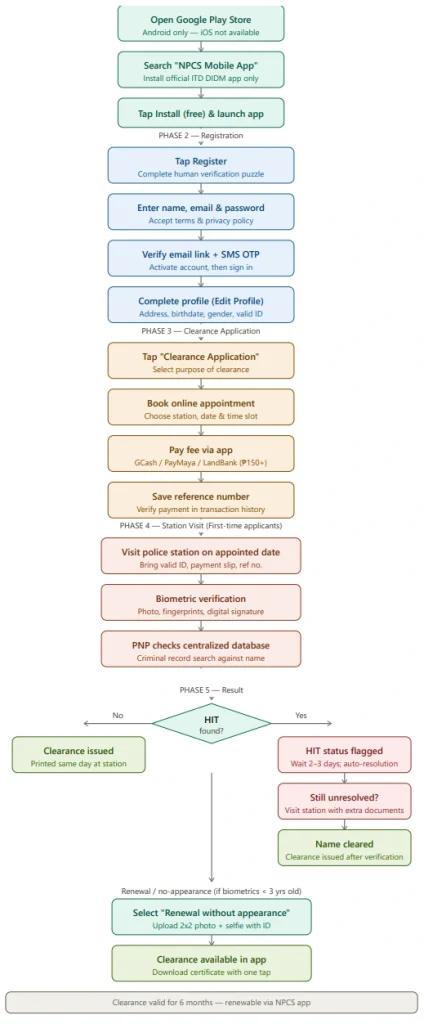
The following infographics represent the overall summary of the NBI clearance process by registering through the NPCS Android phone app:
People also asked:
Conclusion
With the advancement of digital technology, there has been an evolution in the police clearance process, starting from a walk-in mode with longer queues, paper-based forms, and high waiting times to a fast and convenient online system through a central website. Now, to ease the usage for mobile users, the NPCS Android app has been launched, which is even more convenient to have police clearance in your hands within a minimum time.
All of the important processes, including registration, initiating a clearance application, online appointment booking, online payment, and even downloading the clearance, have been integrated into the online mobile app. Just know how to use it, and you can do it at ease. The only thing that still requires physical appearance is the biometric verification, including capturing a photograph, fingerprints, and digital signatures.
The government of the Philippines has a good focus on the digitization of systems. We believe that the biometric verification will also become online in the future, once the fingerprint and picture data of all the citizens is centralized by the government and linked up with the NPCS system. However, currently, it requires a physical appearance with an online appointment.
Go to the Google Play Store, install the NPCS phone app to have accurate and updated information on police clearance matters, and enjoy a hassle-free online police clearance experience.