Police Clearance Verification Online | Authentic Guide 2026
Clearance verification is the process of authentication of the clearance certificate to check if it is valid. This is very crucial for you to check the current status of clearance. Moreover, if you are an employer or a business owner, it is very important for you to verify the authenticity of the clearance certificate provided by your employees, vendors, and suppliers before hiring employees or selecting vendors or suppliers for business needs. This verification will help you to avoid any legal issues in the future. In this article, we will describe the process of verification, covering all the necessary steps for your guidance.
Clearance Verification Methods
After processing your police clearance application, you can also verify your own or your employees’ clearance status. The verification process is very simple. It can be verified through the PNP helpline, PNP branch, or the police station by providing your identity. You will also need to specify the purpose of verification if you are verifying some other person’s clearance from the helpline or the police station.
The most convenient method to verify a clearance is the online verification. In the online method, you can verify clearance through the PNP clearance website or using the NPCS mobile app. Even if you are to verify the clearance of some other person, you just need their clearance number and their surname. If a copy of the clearance certificate is available, then it can simply be verified by just scanning the QR code on the document. In this article, we will explain the verification processes in detail.
Calling the Hotline / Police Station
- You can call the PNP helpline or some police stations to verify the clearance status by providing the clearance number and mentioning the purpose and your identification.
- The contact details of the PNP hotline and local police stations are given in the contact details.
Verification by Visiting the Police Station
It can also be verified by physically visiting the police station and presenting the existing clearance certificate, purpose of verification, and your ID proof.
Online Clearance Verification
This is the process of checking the authenticity of the certificate on the official PNP website by entering the “clearance number” of the candidate. Online verification methods are the most convenient, effective, and easy. You can verify clearance online via QR code scanning from the certificate, by visiting the official PNP clearance website, or by using the NPCS Mobile app. Online clearance verification results will show if the clearance is valid, expired, or aborted.
Reasons for the verification of clearance
Why do we need to verify clearance? This is a very common question. Think of a scenario: you are hiring an employee at an important position in your company, or you are making a big business deal with a person, or you are renting out your shop or home to some tenant; you must be worried about the character and the legal status of the concerned person. In such a situation, you demand a “police clearance” certificate from the concerned person. In order to check whether the police clearance document is legitimate and authentic or not, you must verify the clearance. The following are some of the common reasons for clearance verification:
- Employers offering you a job
- Can be part of travel documents
- Foreign employment
- Large Bank Transactions
- Business Permits
Beware of Fixers and Fake Clearance Scams
Some individuals or “fixers” offer to speed up or guarantee your police clearance for an extra fee, especially outside crowded stations. The PNP has not authorized any private individual, agency, or third party to process a police clearance on an applicant’s behalf.
A fixer-obtained clearance is often fake or invalid, even if it looks convincing at first glance. Using one can expose you to serious legal risk, including possible charges for using a falsified public document, aside from wasting the money you paid.
⚠ Common Mistake: Assuming a clearance “looks official” means it is real. A convincing logo, stamp, or signature proves nothing on its own, since the only reliable check is the online verification system or the QR code scan.
💡 Important Tip: If someone offers to get your clearance without an appointment, without biometrics, or for a “rush fee” outside the official payment channels, treat it as a red flag and verify through the official portal before paying anyone.
Always apply directly through the official NPCS portal or app, and verify any clearance you receive, whether it is your own or someone else’s, using the QR code or reference number before relying on it for any transaction.
PNP Online Verification of Clearance
NPCS provides a very convenient online clearance system for online applications and verification. The PNP has launched an official online web portal that is connected to the central database of the Philippine Police. The database contains a complete clearance record and criminal history for all the individuals residing in the country. NPCS has also launched an app on the Google Play Store. The name of the app is “NPCS Mobile App.” This app is a mobile version of the PNP Clearance Web Portal. You can also have online police clearance verification using the NPCS mobile app.
We have the following online police clearance verification methods:
- Using the PNP Clearance Website
- Using NPCS Mobile App
- Scanning the QR code on the clearance certificate
In the following sections, we will explain all the above online methods of police clearance verification.
Online Verification Through PNP Clearance Website
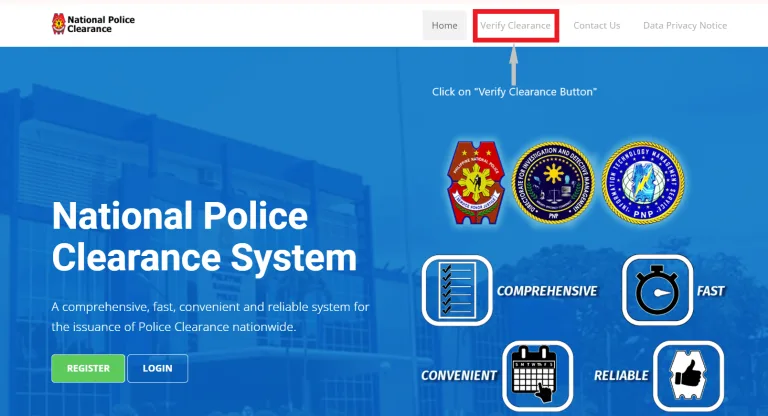
- Proceed to the official PNP Clearance website.
- Click on the verify clearance button.
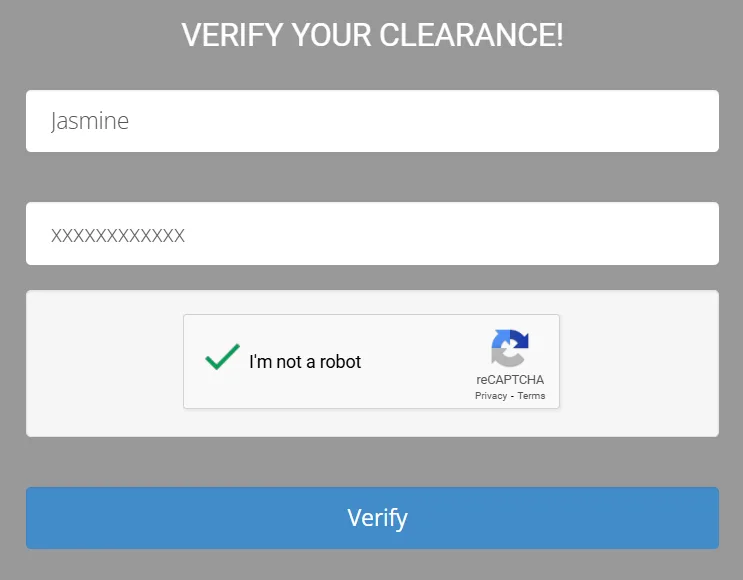
- A new dialogue box will appear for verification.
- Enter your surname.
- Enter the clearance number, which needs to be verified.
- Check the box “I am not a robot” to verify the captcha.
- Click on the verify button.
- The system will then show the clearance verification details.
Online Verification Using NPCS Mobile App
In this era of technical advancements in mobile technology and excessive use of smartphones, the NPCS has also launched its mobile app, which is available on the Google Play Store. All the functions available on the PNP web portal are also available on the mobile app. The clearance verification process is also very simple and convenient using this mobile app. The following is the complete online police clearance verification process using the NPCS mobile app.
- Go to the Google Play Store on your mobile phone.
- Type “NPCS Mobile App” in the search bar.
- Install the app by clicking on the install button.
- Complete the app registration process. However, for clearance verification, you can verify without registration.
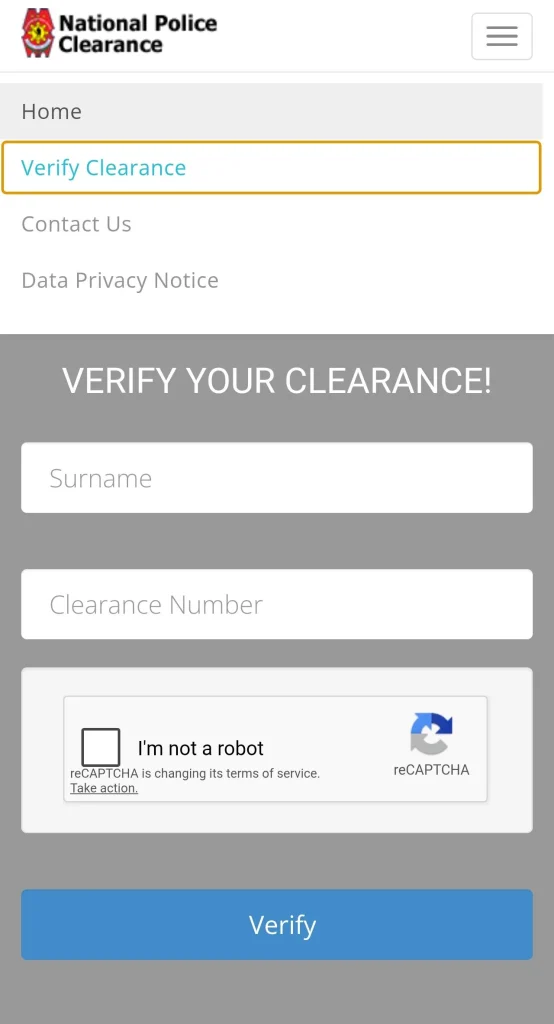
- For online clearance verification, click on the three lines in the top right corner of the screen and select “Verify Clearance.”
- Click on the verify clearance button.
- A new dialogue box will appear for verification.
- Enter your surname.
- Enter the clearance number, which needs to be verified.
- Check the box “I am not a robot” to verify the captcha.
- Click on the verify button.
- The system will then show the clearance verification details.
Online Police Clearance Verification By QR Code Scanning
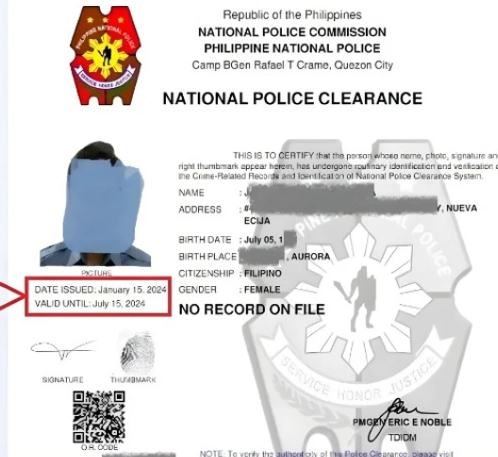
Every police clearance certificate issued by the NPCS has a QR code on it. That QR code is directly linked to the national police clearance centralized database system. The employers and authorized persons can scan the QR code for police clearance verification of the person claiming it. By verification through QR code scanning, you can verify whether the police clearance is valid, expired, or revoked.
- Get the police clearance certificate that needs to be verified.
- Check for the QR code mentioned on the clearance certificate.
- Scan the verification QR code using your mobile phone’s camera or QR code scanner.
- After scanning, the results will show you the clearance verification, whether it is valid or not.
- Actually, on scanning, the system picks up the data against the verification and redirects you to the verification link.
- You don’t need to manually input information like the surname and the clearance number.
- This process is most convenient to verify the police clearance status of your employee, tenant, or the person with whom you are having some legal or business deal.
Is there any verification fee?
No, there’s no authentication verification fee. It is a free service. You just need to enter the clearance number on the NPCS mobile app or the online portal of NPCS for the verification of clearance, or simply by scanning the QR code on the clearance certificate.
Frequently asked questions (FAQs)
Conclusion
Verification of the clearance is very important for employers, business owners, and other stakeholders involved in business dealings, property rental matters, the sale or purchase of assets, and other legal or official matters. This process has become very easy after the launch of the online clearance verification system through the PNP web portal, connected with the central database of the police.
In this blog, we have clearly elaborated on the verification methods and the step-by-step procedure for online verification. Using our guidelines, you can easily verify the status of your clearance as well as the clearance authenticity of your employers, suppliers, tenants, vendors, and others by taking a copy of their clearance certificate. Get the clearance number and surname information of the person whose clearance is to be verified, and use the mobile app or the web portal. However, if a copy of the clearance certificate is available to you, simply scan the QR code to verify the clearance.